Resumes
A resume is a marketing tool highlighting selected academic, professional and leadership accomplishments that demonstrate a fit between you and the opportunity. It should address the needs and requirements of your targeted audience.
Avoid resume templates and tables as they often make editing more difficult. Remember, good writers revise, and a resume is a living document that is constantly revised, updated and tailored. A resume is an example of your writing skills; it should be well written, perfectly punctuated, honest and concise. Have your resume reviewed by Hiatt before submitting it or sending it to a networking contact.
Experience comes from everything you do and may include paid and unpaid work, full and part-time jobs, volunteering, campus leadership positions, athletics, academic/classroom project work, or research. Tailor your experience section for each position, including what is most relevant and related.
Tips for Getting Started
Your documents should present who you are as a candidate in a clear, concise, and compelling way that is customized for the position to which you are applying. To get started, we suggest the following:
Applying for the business major:
Resume approval is not required when applying for the Brandeis business major. We strongly encourage all students to have their resume reviewed before submitting their applications.
After you have a draft, make an Express Appointment with Hiatt Advisors for quick help with resume review, Handshake and other career-related questions.
- HA Express Appointments will be available throughout the Fall and Spring semesters, while classes are in session. You can schedule an appointment with a professional staff member throughout the entire calendar year.
Formatting
Expand All
-
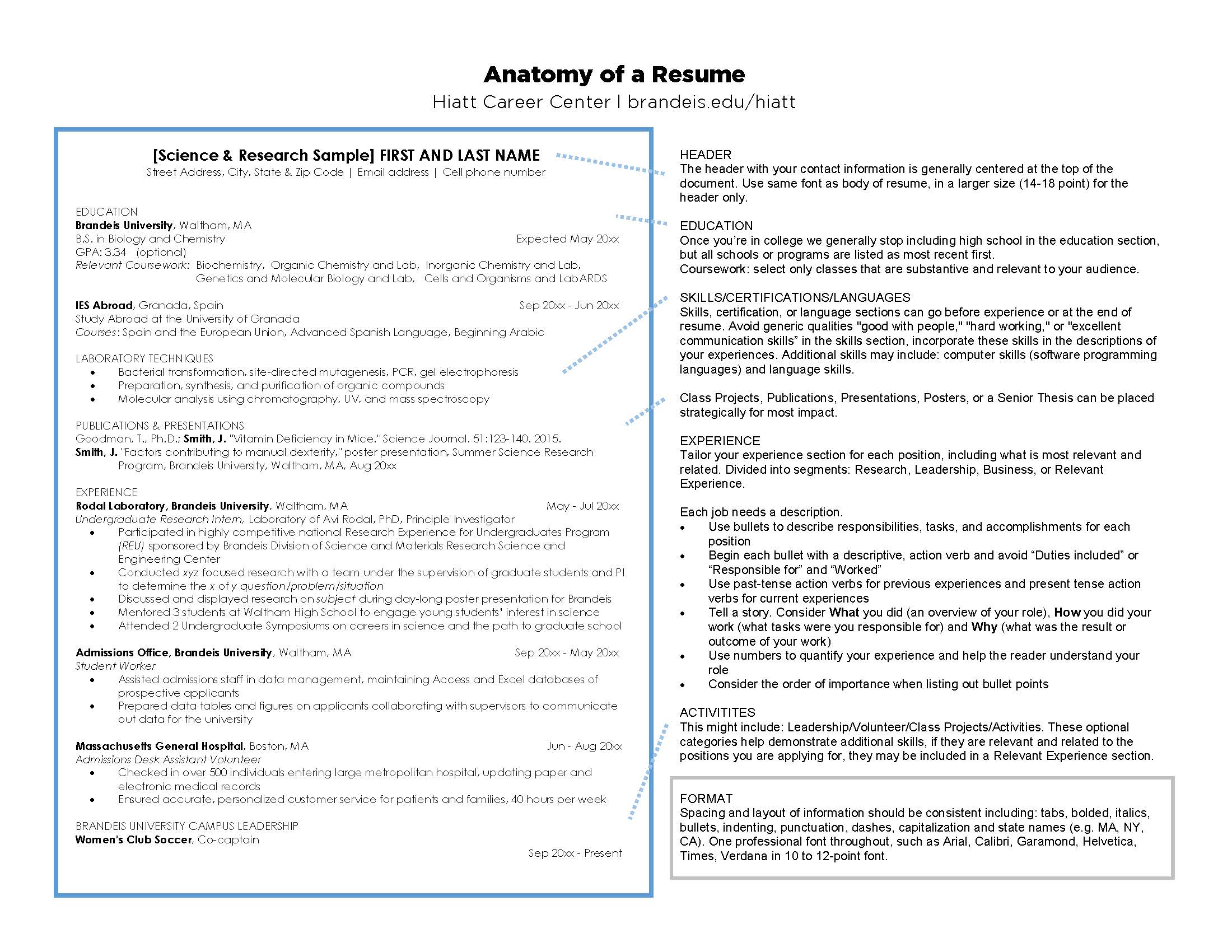
Spacing and layout of information should be consistent including tabs, bolded, italics, bullets, indenting, punctuation, dashes, capitalization and state names (e.g. MA, NY, CA)
-
Avoid gimmicks such as pictures, graphics, bright paper or creative fonts
-
One professional font throughout, such as Arial, Calibri, Garamond, Helvetica, Times, Verdana in 10 to 12-point font
-
Use section headers (e.g. Education, Experience) to break up information and draw the reader’s attention, these should be flush with left margin
- One-page resumes are preferred for most positions and when you plan to bring a resume to a networking event.
- Two-page resumes may be accepted for some nonprofit, government, education, science, graduate school or fellowship applications.
- The second page should be at least half a page of text, with your name and "Page 2" on top of the second page.
- Keep it clean, simple, consistent with margins of .5 inch to 1 inch.
- Any graphic lines (optional) should begin at left margin and end at right margin.
- The header with your contact information (name, current address, phone number, Brandeis email or a professional, appropriate email address — creative, silly or offensive usernames are strongly discouraged and relevant links to professional online content, i.e., LinkedIn page, Twitter handle, portfolios) is generally centered at the top of the document. Use the same font as the body of the resume, in a larger size (14-18 point only)
- Dates should be spelled out using the full month or use standard abbreviations (example: Sept – Dec 2015). Do not use seasons such as fall or summer.
- Periods are not required after bullets.
- Semicolons can be used to join related items in one bullet; do not use colons in section headers.
- Do not use dashes in place of a comma. If you have dashes between dates, be sure to use a space before and after the dash.
- Use colons to list items (e.g., "Collected items for shelter: batteries, dry food, water, clothing").
- Use colons in formal title such as Bachelor of Arts in Health: Science, Society and Policy. Use an ampersand (&) for industry terms or branded company (e.g., Bain & Company). Do not use ampersands as a substitute for "and" within titles such as Bachelor of Arts in Health: Science, Society and Policy & Near Eastern and Judaic Studies.
- Use ampersands to connect compound titles such as in the example above.
Sections
Education
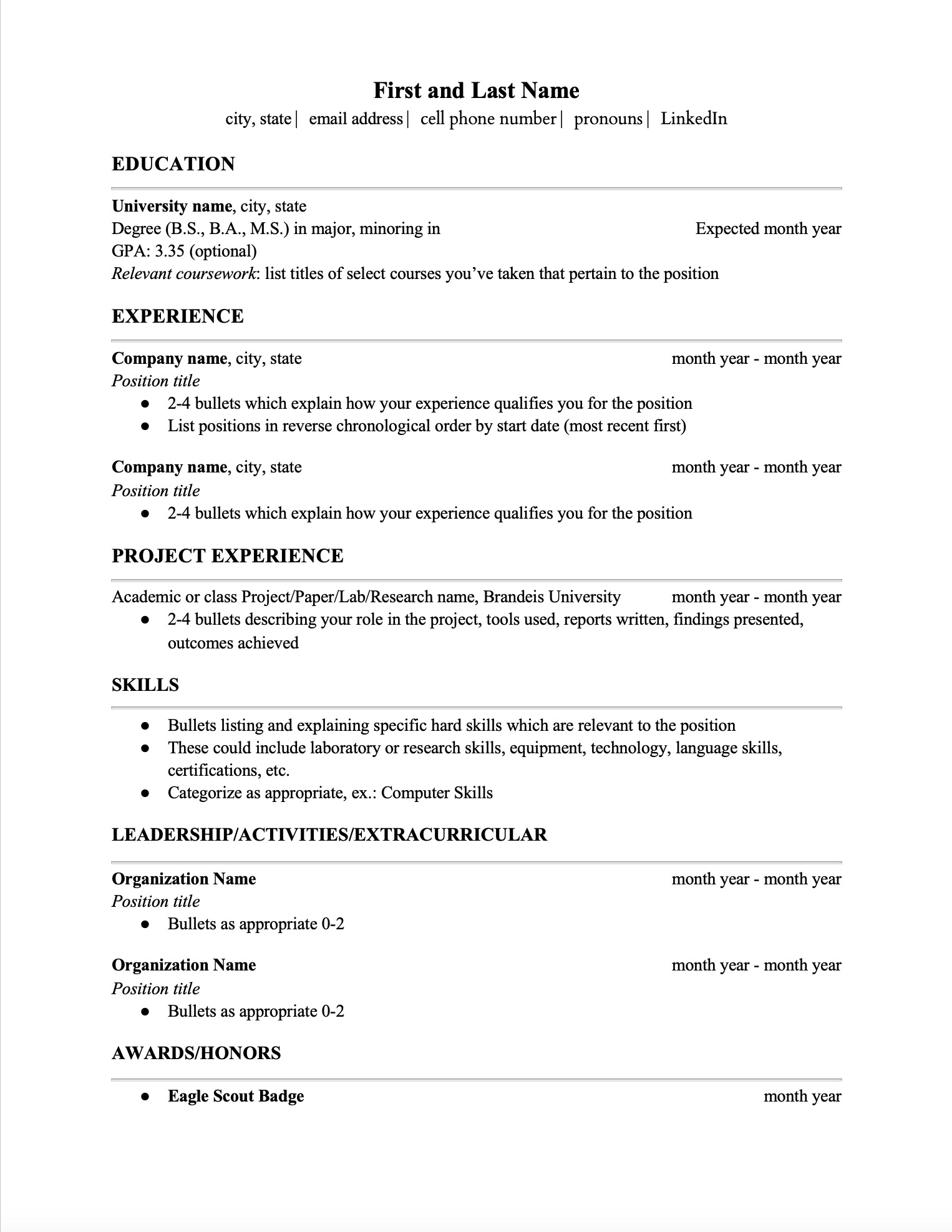
The education section is generally the first entry on your resume. Once you’re in college, we generally stop including high school in the education section. All schools or programs should be listed in reverse chronological order by start date where the most recent activities are listed first.
Experience
Experience comes from everything you do and may include paid and unpaid work, full- and part-time jobs, volunteering, campus leadership positions, athletics, academic/classroom project work or research. Tailor your experience section for each position, including what is most relevant and related.
Skills
In addition to your education and experience, you likely have skills that are useful for the position that you are applying for. A skills section may be made up of technical or language skills, certifications or laboratory skill-related information. Avoid generic qualities like "good with people," "hard-working" or "excellent communication skills.
Expand All
- School name, flush with left margin
- City and state
- Degree earned, abbreviated or written out, flush with left margin
- If you are double majoring, only list one bachelor's degree — either a BA or a BS; consult the registrar's office with questions.
- Include any declared major(s) or minor(s)
- Date of graduation/attendance aligned on the right
- If degree is incomplete, include "Anticipated" or "Expected" before date of graduation
- Coursework: Select only classes that are substantive and relevant to your audience.
- GPA: Use only one or two numerals after the decimal point. Do not round up your GPA (e.g., 3.457 becomes 3.45, not 3.46).
- Study abroad programs or previous schools
- Certification/licensure(s) with correct title, number and date completed (or indicate in progress)
- Latin honors (cum laude, etc.)
- Awards and honors
- Thesis/ independent research/significant academic projects
- Include name of project and short description if necessary
- Indicate title and if the work is still in progress
- May include advisor’s name if relevant to audience
- Use headers: "Relevant Experience," "Additional Experience," "Research Experience," "Leadership Experience," "Volunteer" and/or "Activities" as needed.
- List experiences in reverse chronological order within each section.
- Employer/Organization name: Flush with the left margin
- Title/role: Under the employer, flush with left margin
- City, state (or employer, city, country if outside of the US): Aligned to the right
- Dates (month year – month year): Aligned on the right
- Current experiences are listed as "Start Date – Present" (e.g.,Aug 2013–Present)
- Use bullets to describe responsibilities, tasks, and accomplishments for each position.
- Begin each bullet with a descriptive, action verb and avoid "Duties included" or "Responsible for" and "Worked."
- Use past-tense action verbs for previous experiences and present tense action verbs for current experiences.
Consider:
- What you did (an overview of your role)
- How you did your work (what tasks were you responsible for)
- What was the result or outcome of your work). Use numbers to quantify your experience and help the reader understand your role.
- These optional categories help demonstrate additional skills. If they are relevant and related to the positions you are applying for, they may be included in a "Relevant Experience" section.
- Use the same format as other experience sections.
- No matter where your experience takes place, employers want to see your experience on a resume.
- Describing virtual work allows you to demonstrate skills including communication, organization, time-management, technology, productivity and more in a virtual space.
- Be sure to showcase these skills in bullet points to demonstrate the range of your abilities and strengths.
Examples:
The Gromwell Group, Virtual, May-August 20xx
Talent Acquisition Intern
- Built strong relationships with corporate clients through prompt and professional virtual communications, oversaw billing and payment for over 5,000 clients
- Designed reports in Excel for monthly accounting audits to identify revenue sources and ensure accuracy
- Developed and relationships with recruiters, clients, and vendors to better promote the company’s services and talent
Educational Productions Intern May - Jul 20xx
WGBH Public Television, Boston, MA
- Supported on-air talent virtually by creating daily news summaries on current events in the Boston market and researching story ideas
- Performed maintenance and xml coding on national scale public television database for educators, www.teachersdomain.org
- Organized and compiled legal clearances for an online media collection about civil rights
Hiatt Career Lab: Crafting Effective Bullet Points

Craft compelling resume bullet points that effectively highlight your qualifications, achievements, and skills!
Review these practical strategies to make your resume stand out, with clear examples to guide you along the way.
Crafting Effective Bullet Points
Portfolios
A portfolio is a showcase for your achievements and talents, which can be used to show samples of your work certificates, diplomas, awards, letters of commendation and so on. It is most often presented online/electronically, in a good quality binder or in a visual arts portfolio.
A portfolio allows you to expand on your resume in a comprehensive manner and concretely share your area of expertise. You can be more creative in your portfolio than you are in producing your resume and cover letter. If you create a "master portfolio," you can easily pick and choose items to customize a portfolio for a particular position.
Expand All
- Samples of your work or reference letters testifying to the quality of your work
- Your career goals or career mission statement
- A copy of your resume
- A list of your skill sets or competencies
- Letters of reference or recommendation from previous employers, volunteer work, work-study programs, such as campus jobs, internships, co-op programs, summer jobs, peer tutoring and so on
- Transcripts
- A summary of community service or volunteer work you have done
- Academic awards
- Copies of non-confidential positive performance appraisals
- E-mails, thank you letters, and handwritten notes complimenting you on a job well done
- Company announcements of promotions, awards or achievements
- Documents you may have designed: brochures, flyers, pamphlets, report covers, reports
- Flyers, conference brochures or other materials describing presentations, workshops or seminars you have presented
- Photographs representing projects you have been involved in. For example, a photograph of a conference display booth you created for a previous employer.
- A video you have made, videos of dance or vocal performances or images of your art work
- A sample program or computer science project
- A teaching philosophy statement and sample lesson plans
- A list of articles you have published
- Samples of articles you have published
- A report on research you have conducted
- Articles written about you or projects you have been involved in (newspapers, company newsletters, etc.)
- A list of professional memberships or associations you belong to that are work-related, including any special committees on which you serve
- Copies of evaluations from a workshop you presented or a speech you made