Antivirus Protection
ITS uses enSilo as our antivirus/malware tool to ensure that Brandeis maintains a secure computing environment against malicious activity. enSilo is designed to stop advanced cyber threats, viruses and malware, in real-time.
What is endpoint security protection?
Any device, such as a computer, smartphone or tablet, that is connected to the Brandeis network provides an entry point for possible cyber threats. Endpoint security protection aims to adequately provide a secure connection to the Brandeis network against viruses and malware specifically on university-owned computers.
What is enSilo?
enSilo is the endpoint security protection tool that Brandeis uses for antivirus and malware protection. enSilo is designed to protect the execution of antivirus/malware, ransomware and other suspicious activity on your machine. Unlike a traditional antivirus/anti-malware software which may require a scan to be initiated, enSilo works in real-time to detect and prevent unknown or malicious activity on your machine.
How is enSilo installed on my machine and what will I see after installation?
ITS installs enSilo to university-owned, centrally managed machines as part of your complete Brandeis image. You can see enSilo on your computer.
enSilo system icon — Windows
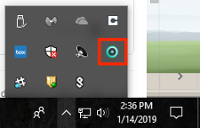
enSilo system icon — Mac

Do I need to run an antivirus scan?
You're all set — no action is required on your part; no need to run a manual or period anti-virus scan. enSilo is designed to protect your machine in real-time by detecting and preventing any unknown or malicious activity on your machine.
Does enSilo slow down my machine?
The enSilo endpoint security protection tool is designed to use less than 1% of computer processing power.
I want to learn more! Who can I contact?
To learn more about enSilo endpoint protection and information security in general, please contact the ITS Security team:
- Call 781-736-4592.
- Send an email to security@brandeis.edu.
- Submit a ticket.
If you encounter an issue with virus or malware activity on your machine, please contact the Technology Help Desk.