Phish Alert Button
Spot a phish? Report it with one click!
We are introducing a new feature in your Gmail toolbar to help keep our community safe from email scams: the Phish Alert Button. Using it is the fastest and most effective way to report suspicious emails and protect yourself and others from cyber threats.
Remember the simple rule: Stop. Look. Think. Report.
How to Use the Phish Alert Button
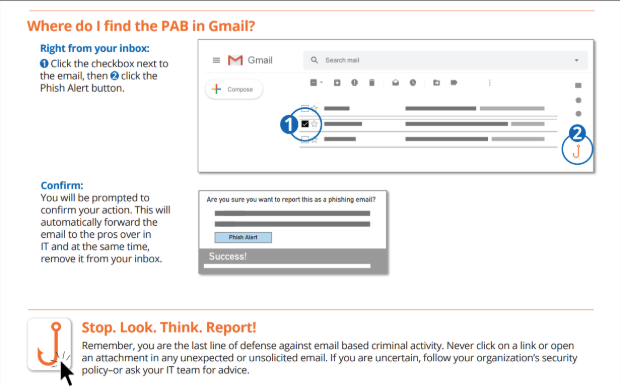
Reporting a suspicious email is now a simple 3-step process.
-
Select the Email: In Gmail, open the suspicious message. You don't need to click any links or download anything.
-
Click the Button: Look for the Phish Alert Button (it may look like a fishhook or a shield icon) in your toolbar at the top of the email. Click it.
-
Confirm: A prompt will ask if you are sure you want to report the email. Click Yes to confirm.
That's it!
Frequently Asked Questions
Expand All
Once you confirm, two things happen automatically:
- It's sent to security: The message is immediately and safely forwarded to our security team for investigation. This helps us block real threats before they can affect others.
- It's removed from your inbox: The suspicious email is deleted from your inbox, so you don't have to worry about accidentally clicking on it later.
What about training emails? Sometimes, our security team sends simulated phishing emails to help everyone practice. If you correctly report one of these safe simulations, you will receive an immediate pop-up message letting you know you spotted the test.
Use the Phish Alert Button whenever an email seems "off" or suspicious. Trust your instincts. Good candidates for reporting include emails that:
- Ask you to click a link or open an attachment you weren't expecting.
- Create a false sense of urgency, like a threat to close your account.
- Appear to be from a trusted source (like IT or HR) but ask for your password or personal information.
- Contain unusual spelling and grammar mistakes.
Don’t use PAB for normal spam or promotional email. These can just be deleted.
The bottom line: If you're unsure about an email, the safest thing to do is report it. Never click links or open attachments in an email you don't fully trust.
It’s removed from your inbox. Our team will investigate the forwarded message. If the message is needed for other reasons, InfoSec will advise what to do next.
No worries — our security team will review and mark it safe. If you need it restored, contact the Help Desk and include details of the message.
No single tool stops everything. PAB helps quickly get suspicious messages to InfoSec so we can analyze and block threats faster — but user caution and training remain essential.
PAB only forwards email. It does not remove or change shared Google Drive data. If a phishing attack involves shared files, InfoSec will advise on next steps.
We will run awareness and training about how to use PAB. If we run phishing simulations, we’ll notify participating groups and share lessons learned. We will not use the entire campus for blind testing without coordination.
We’re integrating the Phish Alert Button into Gmail.
Adoption takes time. We’ll use email reminders, campus signage (InBrief), and short training messages to help users learn how and when to report.