Echo360: Lecture Capture & Video Management

Echo360 is the primary video platform for the Brandeis community to host, manage, and record academic media. It integrates directly with Moodle and Zoom to provide a seamless workflow for instructors and students.
Key Features
- Centralized Library: Manage, store, and share digital media in one place.
- Zoom Integration: Zoom recordings are automatically copied to your Echo360 library for long-term management.
- Automatic transcriptions: All hosted content receive automatic transcripts with a built-in editor for quick refinements.
- Interactive Tools: Enhance videos with Embeded polls and view detailed Detailed Analytics to track student engagement.
- In-Platform Editting: Trim the beginning/end or cut sections from the middle of your videos without external software.
- Moodle integration: Easily post videos to your course pages or request automated recording schedules.
Classroom Recording Options
Brandeis classrooms offer different recording capabilities based on the installed hardware.
List of Equipped Classrooms
Automated Lecture Capture
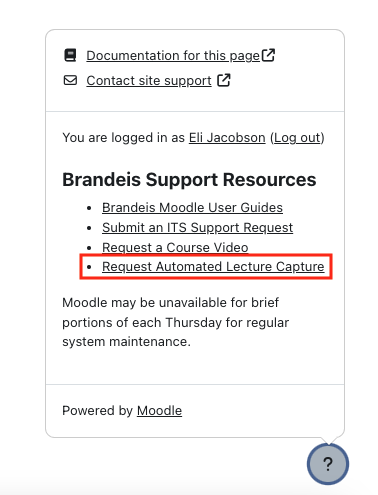
Select rooms on campus are equipped with the ability to provide Automated Lecture Capture services. Automated capture schedules must be requested at least two weeks prior to the start of each semester. You can either follow the link below to fill out the request form or can make the request directly from the Moodle Course Page. Look for the "Question Mark" icon on the bottom right side of the page.
Request automated lecture capture
Echo 360 Resources
FAQs
Getting Started
Expand All
Echo360 accounts are available to all faculty, students and staff. Accounts are provisioned automatically when a user interacts with an Echo360 activity on Moodle.
Instructors: Instructor accounts are generally provisioned when a request for lecture capture is fulfilled.
Students: Student accounts are provisioned automatically when an Echo360 activity is accessed on Moodle. If a faculty member has shared a link to the Echo360 section on Moodle, a student account will automatically be created when they click on the link if one does not exist already. A student can also provision their Echo360 account by clicking on the Echo360 button in the Moodle toolbar within a Moodle activity. Look for the blue button in the activity toolbar of any Moodle activity.
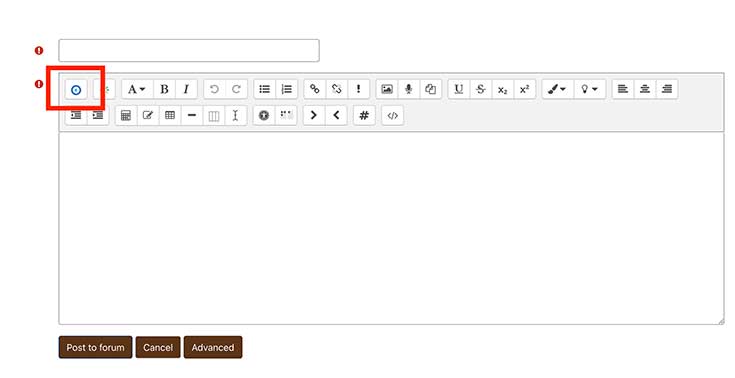
Once you have an account, you can log in by visiting login.brandeis.edu and clicking on the Echo360 icon or by visiting echo360.org and use your Brandeis Unet email address to log in.
If you have trouble accessing your account or need to request an account to be created manually, please email mts@brandeis.edu
The Echo360 automated lecture capture system is installed in select classrooms on campus and allows for sessions to be scheduled for automatic recording. These recordings have the ability to incorporate both content (anything that comes out of the projector) as well as video (via a video camera installed in the room) or just one or the other.
Please refer to the HyFlex Classroom Technology webpage for up-to-date information on equipped classrooms.
You can request lecture capture services by completing and submitting the Brandeis Automated Lecture Capture Request Form. A link to the form is avaialble on all Moodle pages within the "help bubble" located in the bottom right corner of the screen.
Videos on Echo360 will remain fully viewable for 2 years from the last time a video is played. After 2 years, the video will go into an archived state, and must be manually recovered to become viewable again.
When an Echo360 video is viewed, the timer will be reset and the video will be viewable for 2 years from the time of viewing before it is moved to an archived state.
Learn more about how to recover archived videos from Echo360's Recycle Bin.
Recommended web browsers include up-to-date versions on Google Chrome, Edge, Safari and Firefox. Read additional details on web browser compatibility.
- Maximize class time — Whether you're flipping the classroom or recording feedback on test results, Lecture Capture helps you use valuable class time for more engagement, discussions and group learning activities.
- Improve learning outcomes and satisfaction — Providing students with 24/7 online access to lectures, course materials, and collaboration tools has been proven to improve learning outcomes and boost student satisfaction.
- Customize and re-purpose your content — Lecture Capture gives you the freedom to personalize and record content at your convenience using Personal Capture. Create media-rich presentations or prepare students for lab exercises. You'll also save time by updating and re-purposing content for future courses.
- Forecast problem areas — With built-in analytics, you no longer have to worry about whether students have a firm grasp of course concepts. Using the Lecture Capture detailed statistics, you can predict trouble spots well before they start to impact grades.
While many campus classrooms are equipped with automated Echo360 lecture capture systems, the Echo360 media platform is still very relevant for those who are teaching remotely or in a campus location that does not have an automated system. Your Echo360 library will host all of your academic video content including all of your Zoom recordings and allow you to easily post them to Moodle.
Even if you are not teaching in physical classroom, you may want to fill out the Echo360 course request form to have your course setup in the Echo360 system. A link can then be posted on your Moodle page that will aggregate all of the Zoom recordings from your class in one place.
Transferring content across platforms is possible, but it is a manual process. For questions or assistance, please contact Media Technology Services by emailing mts@brandeis.edu.
Moodle and Zoom Integrations
Expand All
Zoom and Echo360 now work together so that all of your Zoom recordings are automatically copied to your Echo360 library. This allows your Zoom recordings to be retained for an extended period of time (18 months), as well as access to Echo360's suite of tools for managing your videos including automatic transcript, video editing tools, embedded quizzes and analytics.
Echo360 is also integrated with Moodle so you can easily post videos directly to your Moodle course.
Relevant support articles:
Yes, instructors and students can add a video within a Moodle course. Instructors can add a video by creating an activity such as "Label" and then add a video via the Echo360 integration button. The instructor can also setup a "Forum" or "Assignment" activity so that students can submit video assignments via the Echo360 integration button.
Recordings are generally available within a few hours after the end of the session and accessible through a course Moodle page.