Microsoft 365 Applications & Availability
Brandeis provides Microsoft 365 to the campus community, giving you access to essential tools like Word, Excel, PowerPoint, and OneNote. Your specific access depends on your role at the university.
💻 Students, Faculty, and Active Staff (A3 License)
If you are an active student, faculty member, or staff member, you have the most comprehensive access:
- Full Suite: Use both the online web versions and the desktop applications.
- Install Everywhere: You can install Office on up to five devices, including your personal laptop, tablet, and phone.
- Storage: Includes 25GB of cloud storage for your files.
🎓 Students using personal computers
- Go to www.office.com and click "Sign-in."
- Enter your Brandeis email address.
- If prompted, select "Work or School account."
- Log in with your Brandeis password.
- Look for the "Install apps" button on the home page to download the software to your device.
🖥️ Faculty and Staff using university-provided computers
- Automatic Setup: The Desktop Systems team usually installs the apps for you during the setup process.
- Sign-In Required: If your computer was set up or updated after August 1, 2024, you must open an app (like Word) and sign in with your Brandeis email and password to activate the license.
- Personal Devices: Remember, you can also install these apps on up to five additional personal devices.
🌐 Temporary Staff, Affiliates, and Contingent Workers (A1 License)
If you are a temporary employee, affiliate scholar, or contingent worker, your access is web-based:
- Online Only: Use Office for the Web (Word, Excel, PowerPoint, and OneNote) through your internet browser.
- No Desktop Apps: This license does not include the ability to download or install the software onto your computer.
- Storage: Includes 25GB of cloud storage for your files.
If you only have access to the web versions:
- Go to www.office.com and sign in with your Brandeis credentials.
- Click the "Apps" icon (the grid in the top corner) to open Word, Excel, or PowerPoint directly in your browser.
⚠️ Important Notes
- To get started, simply log in with your Brandeis credentials at portal.office.com.
- Limited App Library: Not every app you see on the Microsoft dashboard is available for Brandeis users.
- Service Updates: To ensure better technical support, Brandeis is streamlining the office.com portal by removing some secondary apps.
- Guaranteed Apps: This change will not affect your access to Word, Excel, PowerPoint, or OneNote.
Frequently Asked Questions
Expand All
- Microsoft Word
- Microsoft Excel
- Microsoft PowerPoint
- Microsoft OneNote
- Microsoft OneDrive (25GB storage limit)
There are two ways to open an Office App.
The first way is to access the App Menu in the upper left-hand corner of your screen made up of nine dots. Click the dots, then choose the application and double-click
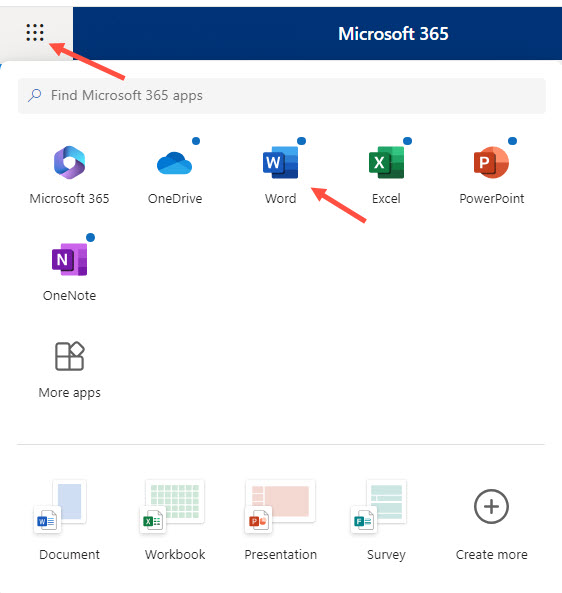
The second way is to choose one of the apps from the left-hand side of your screen and click the desired one.

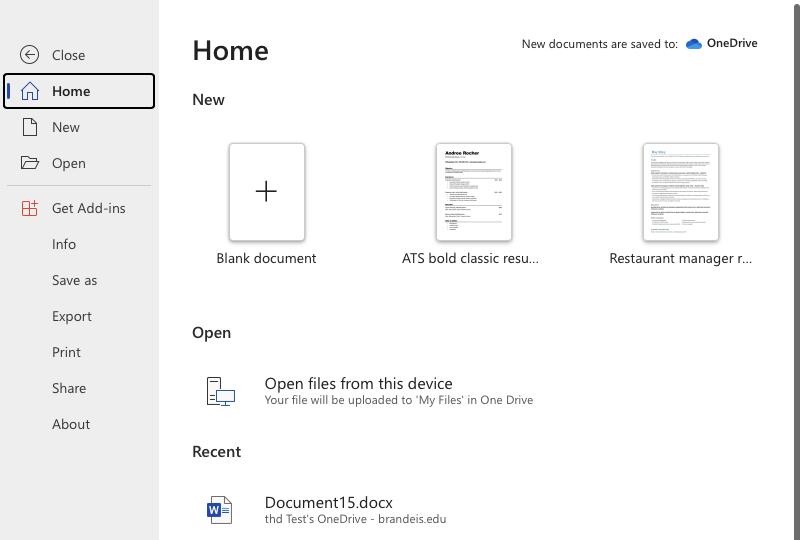
Yes, you can still open locally stored files from your device. There are two ways to do so:
- Open the Office app (such as Word) in Microsoft 365 Online. Select "blank document", click "File" again, then choose "Open Files from this device and browse to your personal files. You will need to have pop-ups enabled in your internet browser.
- Or, you can click the "Upload" button and browse to your personal files. The file will be uploaded and open in a separate tab. You will need to have pop-ups enabled in your internet browser.
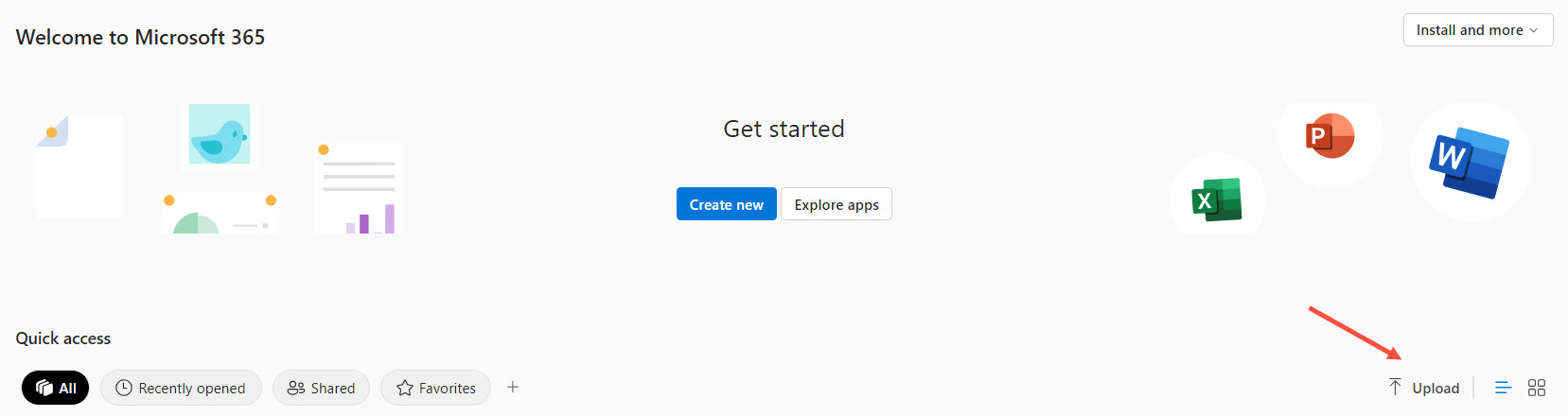
The file, either one you create from your online apps or one you upload from your device, will be automatically saved to your OneDrive storage. It works similarly to Google Drive and saves your work automatically.
All users with a Microsoft 365 Online account have 25GB of storage space in OneDrive.
To save your file locally, choose "Files, "Save As" then "Download a copy". The file will be downloaded and saved on your computer in the Downloads folder.
To edit the file, you will have to upload it again.
You only need to upload the files that you're actively working on. You may also upload your files to Box for storage as well or to Google Drive.
If you saved a file to OneDrive, open the OneDrive app and it will be available there.
You may need to allow pop-ups in your browser so that the new browser tab will open.
In Chrome:
- Click the three dots in the top right corner
- Go to Settings
- Search for "pop-up"
- Select "Site Settings"
- Select Pop-up and use redirects
- Under "Allowed to send pop-ups and use redirects" add https://c569257608da4dcaafbc-my.sharepoint.com
In Safari:
In Firefox:
- Select the Firefox menu (for Macs) or click the 3 dots in the top right corner (for PCs)
- Go to Settings.Search for "Pop-ups"
- Click "Exceptions" at "Block Pop-up windows"
- Add https://c569257608da4dcaafbc-my.sharepoint.com
- Click "Allow"
- Click "Save Changes"
In Edge:
Yes - our license allows you to install the desktop versions of the applications on up to five devices.
If you have any questions regarding Microsoft products or licensing, please email help@brandeis.edu, or call X64367 (6-HELP) from an on campus extension or 781-736-HELP (4357) for calls made from non-campus lines.
The University does not currently support Teams as we have other licenses and supported alternatives (Zoom or Google Meet for video conferencing, Google Chat for instant messaging). We are aware other colleges and universities, vendors, and community partners use Teams and that we at Brandeis are asked to use them as well.
You can use Teams as a guest, meaning if you are given a Teams meeting link you will be able to join a Teams meeting you are invited to. You cannot initiate a Teams meeting, nor will you be able to use Teams as a chat/messaging tool.
If you receive a Teams meeting invite, you will be able to join as an attendee in the application - you cannot initiate a meeting. You will not be able to sign into Teams with a Brandeis username and password.
If you are currently signed into Teams with your Brandeis username and password, we strongly recommend you sign out of Teams and join other organizations' Teams meetings as "guest".