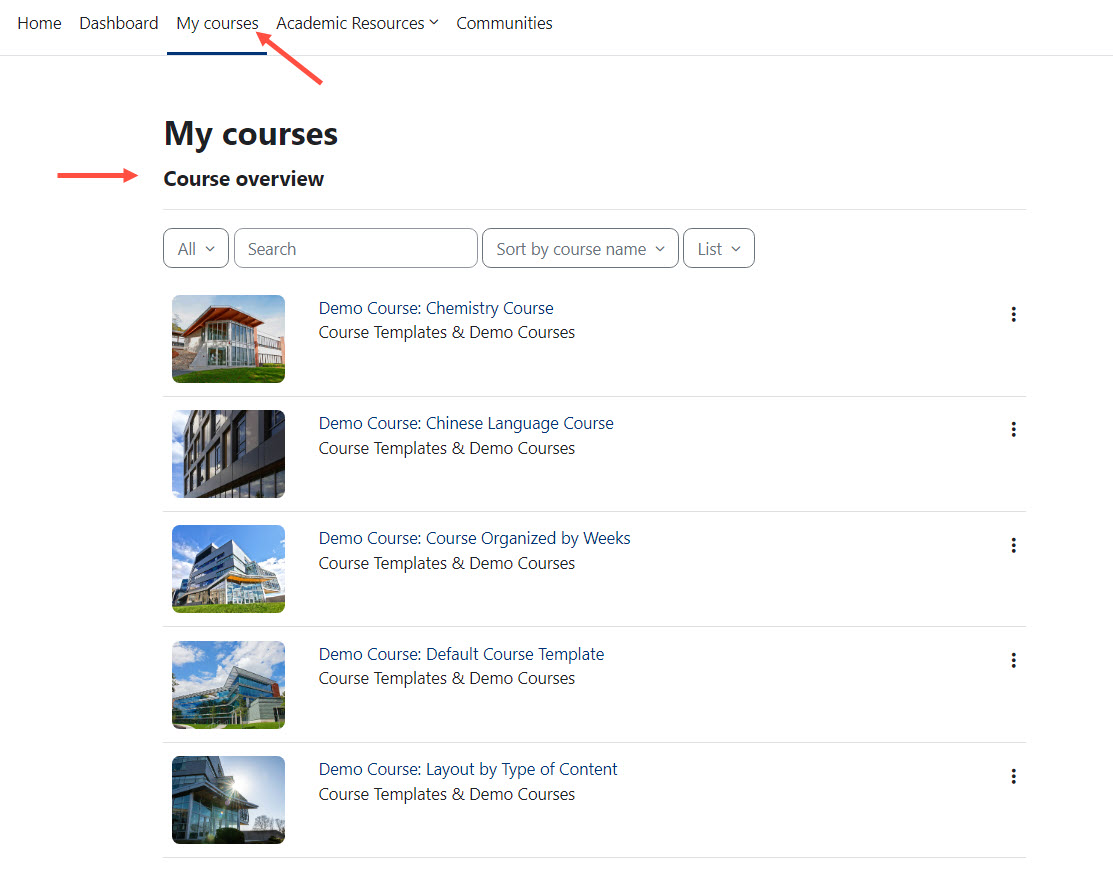
Accessing Courses in Moodle
If you are enrolled in at least one course, your courses will be listed on your "My courses" course overview page once you log in to Moodle. Clicking on one of your listed courses will take you to that course's homepage. The faculty member teaching the course is responsible for publishing the course and making it available to students.
Active courses that have been published by the instructor appear in blue. If a course title is black and is marked “Not Visible to Students”, the instructor has not yet made that course available for student access. Only the instructor can publish a course in Moodle.
FAQs
Expand All
All new students need an active Brandeis account and need to be fully matriculated into Brandeis in order to access various systems, including Moodle. Please contact your admissions office to ensure that you have been fully processed.
- Confirm with your instructor that the course has been published and is available for students in Moodle Courses. If it has been published, see below.
- Review your Moodle Courses settings to ensure that you are viewing your current, enrolled courses (view how to customize your "My courses" page in Moodle Courses).
- If you have recently registered for the class, the class has been published, and your course view settings are showing enrolled classes, please wait at least 24-48 hours after you have officially registered for the course in Workday. If after that time, you are not enrolled into the course in Brandeis Moodle Courses, please contact the Technology Help Desk (help@brandeis.edu or 781-736-4357) with the course name and code. If you are unsure whether you have successfully registered for a course in Workday, please contact the Registrar’s Office (registrar@brandeis.edu).
Please wait at least 24-48 hours after you have officially dropped the course in Workday. If after that time, you are still enrolled in the course in Moodle Courses, please contact the Technology Help Desk (help@brandeis.edu or 781-736-4357) with the course name and code. If you are unsure whether you have successfully dropped a course in Workday, please contact the Registrar’s Office (registrar@brandeis.edu).
Brandeis has a course retention policy that prevents course shells from greater than two years ago from being accessed. Please contact the instructor of the course or the department that the course falls under for assistance with obtaining course materials.
You need to be manually enrolled into the course by the instructor and assigned the role. Please contact them to be enrolled into the course in Moodle Courses. If the instructor experiences any issues, they should contact the Technology Help Desk (help@brandeis.edu or 781-736-4357).
When you graduate from Brandeis, alumna/e lose access to the LMS. Please contact the instructor of the course or the department that the course falls under for assistance with obtaining course materials.